Core plan
 $39/mo, month to month
Squarespace’s recommended plan. Basic is $25 a month.
- Pick a template or start with AI YYou
- Write, edit and publish every page YYou
- Hosting, security and the editor
 Squarespace
Squarespace Core is $39 a month, and every page is yours to build and keep up. For $95 a month, I design, write and run the site, so you never have to.


 +100 business owners like you Core plan
 $39/mo, month to month
Squarespace’s recommended plan. Basic is $25 a month.
Squarespace $95/month
$0 to build. No contract. Cancel anytime.
 Patrick
Patrick
Patrick
Patrick
Patrick
Yes, it’s my comparison, so every Squarespace fact links to where it comes from. Checked .
Squarespace’s Core plan, the one it recommends and the first with advanced analytics and site-wide tracking code, next to my one plan.
| What you’re comparing |  Do it yourself Do it yourself | Done for you |
|---|---|---|
 Price What the monthly bill says Price What the monthly bill says | $39 a month, billed month to month. Basic is $25. | $95 USD a month, billed monthly. One plan. |
 Building the site Pages, layout, photos Building the site Pages, layout, photos | You start from a template or Blueprint AI, then edit it into your site and publish. YYou | I research your business and build it. No questionnaire. You review before launch.
Patrick
|
 Writing the words Headlines, pages, calls to action Writing the words Headlines, pages, calls to action | You write it. Squarespace AI can draft text for you to check and edit. YYou | Included. I write the pages, you approve them.
Patrick
|
 Changes after launch New photo, new price, new page Changes after launch New photo, new price, new page | You make them in the editor, whenever you like. An AI chat assistant is rolling out to help. YYou | Included. Routine edits have a 72-hour target. You can edit blog posts and FAQs yourself.
Patrick
|
 Who you talk to When you need something Who you talk to When you need something | Email any time, live chat on weekdays, no phone. Support can’t help with SEO strategy. Squarespace | Patrick, directly, by phone, text or email. No call center.
Patrick
|
 SEO Getting found on Google SEO Getting found on Google | Good tools: automatic sitemaps and structured data, an SEO checklist, Search Console integration and 301 redirects. Descriptions and keywords are yours to fill in. YYou | On-page SEO is included and done for you. Ongoing local SEO is a separate $995/month service.
Patrick
|
 If you leave What you walk away with If you leave What you walk away with | An export file for WordPress with basic pages, text, images and one blog. The design, styles and store pages stay behind. | Every file of the website, and help moving it. It’s custom-coded, so later changes need a developer. |
 Online store Selling products on the site Online store Selling products on the site | An online store on every plan: 2% transaction fee on Basic, 0% from Core up. | Yes, I build online stores. They’re quoted separately, not part of the $95 plan. |
 Design How the site looks Design How the site looks | Designer templates that look polished from day one. Your content stays yours, but Squarespace owns the templates. | A design built for your business, not from a template, and every file is yours. |
 AI help Drafts, images, edits AI help Drafts, images, edits | Blueprint AI turns a description into a multi-page starting point. You finish it and check every word. YYou | No draft to finish. I research your business, write the pages and build them. |
Squarespace is a good builder. The real question is who does the building.

Squarespace Core is $39 a month, and Basic is $25. My plan is $95 a month. If you only count cash, Squarespace wins by a wide margin.
What the Squarespace price doesn’t include is anyone doing the work. You pick the template, write every page, fill in the SEO fields and keep it all current. I wrote about what it really takes to maintain a website, and it adds up. If you’d rather spend those hours on your business, that’s what my price pays for.

$25 to $39 a month, and you do the work.
$95 a month, and I do the work.
Squarespace’s templates are a real strength, and Blueprint AI can turn a description of your business into a multi-page site with copy, images and styling in place. Squarespace calls the result a starting point.
The words still need your eye. Squarespace says you shouldn’t publish AI text you wouldn’t have written yourself, and that what goes live is on you. On my plan, I research your business and write the pages. You approve them.
A fast AI starting point that you finish.
Pages written for your business, ready to approve.
Squarespace handles a lot on its own: sitemaps, clean URLs, structured data and mobile layouts. It adds an SEO checklist, Google Search Console integration and 301 redirects. A Squarespace site can rank.
What it leaves to you is the part that takes thought: page descriptions, keywords and headings, page by page. Squarespace support can’t help with SEO strategy. On my plan, on-page SEO is done for you at launch and on every new page after that.
Good SEO tools, and you fill in every field.
On-page SEO done for you, on every page.
Squarespace’s export is a WordPress-format file. It carries layout pages, text and image blocks, and one blog with its posts. Style settings, custom CSS, store pages, portfolio pages, video blocks and any second blog stay behind, and it only works from an active, published site.
So whoever you move to, the design gets rebuilt. What matters is keeping what Google already knows: every old address gets a permanent redirect to its new page. That redirect map is part of every switch I do.
A partial WordPress file. The design stays behind.
Every old page redirected to its new address.
If you sell products, Squarespace is strong: an online store on every plan, with no transaction fee from Core up. I build online stores too, custom to your products, but they’re quoted separately, not part of the $95 plan.
For service businesses it tilts the other way. Squarespace has form blocks for contact forms, and booking runs through Acuity Scheduling, a separate subscription. My plan includes custom lead forms, online booking and CRM connections.
A strong store built in. Booking is an add-on.
Leads and bookings built in. Stores quoted separately.
Squarespace is cheaper in cash, so here are the real numbers, with your time counted separately.
| Cost | | |
|---|---|---|
| Plan Every month | Core, $39 a month, month to month | $95 a month |
| Design, writing and edits The work itself | Your time, or whatever you pay someone to help | Included |
 Domain yourname.com Domain yourname.com | Free for year one only on a yearly plan, so on monthly billing you pay for it | You keep the domain you have, at whatever you pay for it now |
 Business email you@yourname.com Business email you@yourname.com | One Google Workspace account free for year one on Core, then the standard rate | Not in the plan. Your current email stays where it is. |
 Online booking Appointments on the site Online booking Appointments on the site | Acuity Scheduling, a separate subscription | Included |
 $25 to $39 Plus your time.
 Who does each job, week to week.
| The job | | |
|---|---|---|
| Building or redesigning | From a template or Blueprint AI YYou | I build it, you review it
Patrick
|
| Writing the pages | Every headline and page, with AI drafts to check YYou | I write them, you approve them
Patrick
|
| Changes after launch | In the editor, whenever you like YYou | Text or email me. Blog posts and FAQs you can edit yourself.
Patrick
|
| SEO fields and redirects | Page by page YYou | Done for you
Patrick
|
| Getting help | Email or weekday live chat, no phone YYou | Call, text or email me directly
Patrick
|
Every company gets complaints, and one bad review isn’t a pattern. These four themes come up again and again in public reviews. Each one links to where it comes from, with Squarespace’s side where it has one.
Several Trustpilot reviewers say they wait 15 minutes or more for each chat reply, and wish they could talk to a human in real time. Squarespace skips phone support on purpose. It says online help lets its team see your site and share screenshots, and it offers email any time and live chat on weekdays.
“I really wish I could speak to a human in real time.”
Before you sign up: If you’ll need fast help when something breaks, send support a question during your free trial and time the reply.

In July 2026, Squarespace raised several plan prices, up to 26% on yearly billing, and told customers by email. Reviewers say the notice came about 2 months before renewal, or after a yearly plan had already renewed. That second reviewer later updated the review to say Squarespace refunded the renewal. Squarespace says a new price starts on your next renewal date, not on the date in the email.
“16 days later, they sent me another email advising that the yearly subscription price was going to be raised 27% the following year.”
Before you sign up: Note your renewal date, and read any pricing email from Squarespace the day it arrives, so there’s time to change plans or leave.

Reviewers describe a plan renewing for another full year and a slow refund request, and an email subscription billing for over a year after they canceled the domain it belonged to. Squarespace’s side: it emails a reminder 15 days before a yearly plan renews, monthly plans renew without one, and each subscription bills on its own. Its refund policy doesn’t cover renewal payments, so you have to cancel before the renewal date.
“If you use any monthly Squarespace product, don’t assume cancelling one thing cancels the other, and check your bank statement yourself.”
Before you sign up: Open the Billing panel, list every subscription (site, domain, email, scheduling), and turn off auto-renew on anything you might not keep.
Several reviewers say a domain lapsed after their card changed or a renewal failed, and getting it back cost a fee on top of the renewal. Some came over when Google Domains closed. One says support couldn’t tell them when the grace period ended before it ran out. Squarespace’s side: it emails 30 days before a domain renews, and after the grace period a redemption fee applies that it can’t waive. For a .com, that fee is $45.
“Make sure you understand the renewal process, possible additional fees, and whether you can get timely support when something goes wrong.”
Before you sign up: Keep a current card on file and put the domain’s expiry date in your calendar. If it lapses, the site and any email on it stop working.



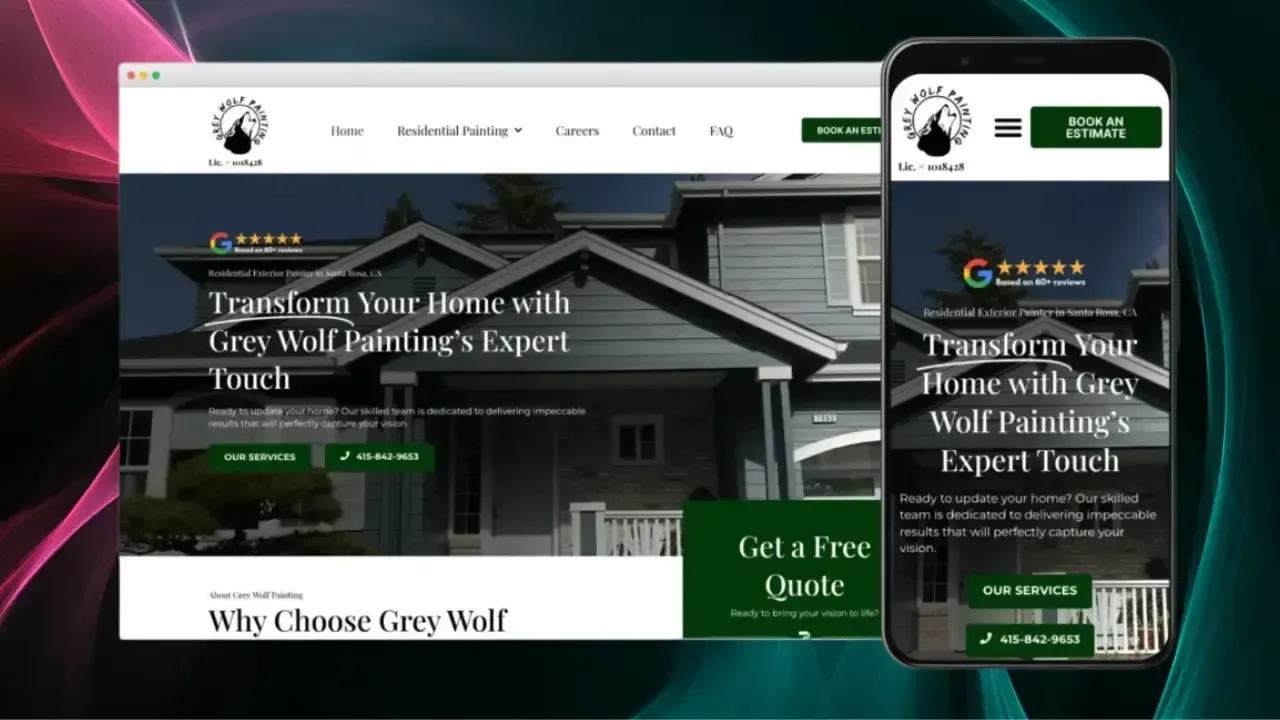
We were looking for someone to completely redesign our site and maximize its performance with SEO services. I found it so helpful that he does it all with an easy and budget friendly payment plan. He incorporated many design elements that created an incredibly polished and user friendly platform.
 Melanie Maese Co-Founder of Grey Wolf Painting · Google review
 The goal: nobody who finds you today hits a dead end tomorrow. Here’s the order I do it in.

Before touching anything, I look at which pages bring in your visitors and leads. With your Search Console access, I protect those first.

Export the WordPress file while the site is still live, download each form’s entries as a spreadsheet, and keep your photos. The export needs an active, published site, so this happens before anything is canceled.
A domain bought through Squarespace stays yours when the site is canceled and keeps renewing. You can point it at the new site or transfer it away, which can take up to 15 days. A free first-year domain loses the free offer when it moves.
Google Workspace email billed through Squarespace stays active after the site is canceled. If the domain moves, its mail records need setting up at the new provider, so I record every DNS setting first and mail keeps arriving.

Each old address gets a permanent (301) redirect to its new page, and your business name, address and phone stay exactly the same.
Contact forms are rebuilt and tested end to end, and bookings move to the plan’s built-in calendar booking. Acuity keeps billing on its own, so it gets canceled once the new calendar works. A store gets its own quote.

You review the new site before it goes live. Once it’s live and the forms, email and redirects check out, you cancel Squarespace. Canceling can take the old site offline right away, so it always comes last.
No build fee, no contract, no upsells. Here’s every feature the monthly price covers.
One plan, because you should not have to study a comparison table to buy a website. Every feature below is included from day one.
$95/month
$0 to build. No contract. Cancel anytime.
Your website is yours from day one.
Imagine what you could accomplish with more than just a Home, About and Contact page.
Hand-coded and served from data centers around the world, not a page builder dragging its own weight around. Fast on any phone, on any connection.
No junky stock photos or cookie cutter icons here.
Great copywriting is the difference between a website that sells and one that doesn't.
Essentially this means making it as easy as possible for Google and AI to find you.
Forms that actually convert visitors into leads.
Plain, simple, straightforward, valuable analytics anyone can read.
Local SEO requires hyper-local intent targeting. Almost every service-based business needs this!
Blogs are awesome if they are used authentically. The age of purely info-based content is over.
We can integrate your social media content directly into your website. Strategically, of course. We don't want visitors getting distracted!
Automatically add new reviews from review platforms (Google, Yelp, etc) directly into your website.
Let visitors book meetings, sessions and appointments directly through your site.
Email newsletters help turn your visitors into subscribers.
Your Privacy Policy and Terms and Conditions are generated by a specialist legal-policy service and update automatically as privacy laws change. Included, with nothing for you to maintain.
We connect your forms to the CRM you already use: HubSpot, Salesforce, Zoho and most other software that connects with outside apps. A custom system gets its own scope.
Automations that send each new lead to the right person, log it in your spreadsheets and handle the follow-up.
Not all hosting is created equal. If you want the Taco Bell of web hosting, Bluehost is waiting for you.
Changes to hours, photos, text and services are included. Routine edits have a 72-hour target; larger requests get an agreed scope and completion date.
No call centers, no offshoring, just your friendly neighborhood Patrick. Based in North America, native English speaker, and fluent in Spanish if that is easier for you.
Not as a working copy. Squarespace’s export is a WordPress-format file with basic pages and one blog, and it leaves out the design, styles and store pages. I rebuild the site, reuse your text and photos, and redirect every old page.
Yes, it has good built-in tools, from automatic sitemaps to structured data. The difference is who uses them. On Squarespace, page descriptions, keywords and headings are yours to write. On my plan, on-page SEO is done for you.
Nobody can promise rankings won’t move at all. What protects them: every old page gets a permanent (301) redirect, your business name, address and phone stay identical, and I submit the new sitemap and watch Search Console after launch.
No. A domain bought through Squarespace stays yours after the site is canceled, and it can point at the new site. Transferring it is optional and can take up to 15 days.
After the new site is live. Canceling can take the site offline right away, and yearly plans are only refundable within 14 days of purchase. Monthly plans aren’t refundable, so there’s nothing to gain by canceling early.
The simple things, yes. You can edit blog posts and FAQs yourself. New pages, layout and design changes, you send to me by text or email, and they’re included.
In cash, yes. Squarespace Core is $39 a month, and Basic is $25. The difference pays for someone else doing the design, writing, SEO and changes. If you enjoy doing those yourself, Squarespace is the better deal.