Compare WordPress vs RapidWebLaunch

WordPress vs RapidWebLaunch: who’s going to look after your website?

WordPress is free software you can bend any way you like, and the upkeep is yours or your developer’s. For $95 a month, I build, write and run your site for you.

+100 business owners like you
Self-hosted WordPress

$0for the software

Plus hosting. One example: DreamHost, $11.99 a month on monthly billing, after $4.99 for the first 3 months.

  • Free software and plugins WordPress
  • Build, write and edit the pages You
  • Hosting, updates and backups You
The Everything Plan

$95/month

$0 to build. No contract. Cancel anytime.

  • I design, write and build it Patrick
  • Changes by text or email, included Patrick
  • Yours from day one, every file Patrick

Yes, it’s my comparison, so every WordPress fact links to where it comes from. Checked .

Side by side

WordPress and RapidWebLaunch, side by side

Self-hosted WordPress, the free software from WordPress.org on a host you choose, next to my one plan. WordPress.com is a different, hosted product, covered further down.

WordPress compared with RapidWebLaunch
What you’re comparing Do it yourself Done for you
Price What the monthly bill says
The software is free. Hosting is extra: DreamHost’s Launch plan, as one example, is $4.99 a month for the first 3 months, then $11.99 a month, billed monthly. $95 USD a month, billed monthly. One plan.
Building the site Pages, layout, photos
You or a developer find a host, install WordPress, then pick a theme and plugins and build the pages. You I research your business and build it. No questionnaire. You review before launch. Patrick
Writing the words Headlines, pages, calls to action
You write it, or pay someone to. You Included. I write the pages, you approve them. Patrick
Changes after launch New photo, new price, new page
Anything, any time, in the WordPress dashboard. Nobody to wait on. You Included. Routine edits have a 72-hour target. You can edit blog posts and FAQs yourself. Patrick
Who you talk to When you need something
No dedicated support. The WordPress.org forums, your host, or a developer you hire. You Patrick, directly, by phone, text or email. No call center. Patrick
Plugins Adding features
Over 73,000 free plugins. Each one you add is one more thing to keep updated. You No plugin library. Forms, bookings, reviews and CRM connections are built into the plan.
Updates and security Core, themes, plugins
Minor and security releases install themselves on most sites. Major releases, themes and plugins wait for you unless you turn on auto-updates. Hosts cover the server, not the software you install. You Custom-coded, so there are no plugins to patch. Hosting and upkeep are mine.
Backups If something breaks
A full backup is the files and the database. Some hosts include them, like Hostinger’s weekly backups. You Nothing for you to set up. I host and look after the site, and every file is yours.
SEO Getting found on Google
Pick readable page addresses in Settings, then handle titles, descriptions and redirects page by page. You On-page SEO is included and done for you. Ongoing local SEO is a separate $995/month service. Patrick
If you leave What you walk away with
Easy. Copy the files and database to any host, or export the content as a file any WordPress site can import. Every file of the website, and help moving it. It’s custom-coded, so later changes need a developer.
What’s different

The differences that matter

I moved my own clients from Weebly to WordPress years ago (here’s why), and later to custom-coded sites, so I’ve looked after both kinds of site for small businesses.

WordPress wins on flexibility, and it isn’t close

Self-hosted WordPress is free, open-source software you can run for any purpose, change and share. The plugin directory lists over 73,000 free plugins. Want a new feature tonight? You install it yourself, without asking anyone.

My sites are custom-coded. They’re built for speed and there’s no plugin to patch, but you can’t install one either. You can edit blog posts and FAQs yourself, and everything else goes through me. If you want to tinker with every part of your site, WordPress is the better fit.

Free software, 73,000+ plugins, total control.

Custom-coded. You edit the blog and FAQs, I do the rest.

Self-hosted means the upkeep is yours

With self-hosted WordPress, you find and pay for a host, install WordPress, then build and maintain the site yourself. There’s no dedicated support, only the WordPress.org forums and your host.

Upkeep mostly means updates. On most sites, minor and security releases install themselves, but major releases wait for a click, and plugins and themes only update on their own if you switch that on, one by one. Older versions don’t get security fixes.

Then backups. A full one is the files and the database, because your pages and posts live in the database. For a smaller site, back up weekly and keep 3 to 5 copies in different places.

Updates, security and backups, done by you or your developer.

No plugins to patch. Hosting and upkeep are mine.

Someone has to run it. Decide who before you pick.

A managed WordPress host can take part of the load. Hostinger’s plan, for example, includes automatic updates and weekly backups. But hosts look after the server, not the application you install on it. And trying new themes and plugins on a live site can cause functionality issues and even downtime.

Running WordPress well takes intermediate technical knowledge. If that’s not you, you’ll want a developer, and a written agreement on who does updates, backups and fixes. Rates vary, so get that quote before you commit.

Or you hand the whole thing off. On my plan, I build it, host it, keep it fast and make your changes, and you talk to the person who built it.

You, or a developer you hire and manage.

Me, for $95 a month, changes included.

Leaving WordPress is easy. Leaving me is too, with one catch.

WordPress is easy to move. Keep the same domain and you can move by copying the files and database to a new host. The export tool saves your posts, pages and comments as a file any WordPress site can import. Any WordPress developer can pick it up from there.

My sites are yours from day one, and you get every file if you leave. The catch: it’s custom-coded, not WordPress, so it won’t open in a WordPress dashboard, and bigger changes later need a developer.

Any host, any WordPress developer, any time.

Every file is yours. Later changes need a developer.

WordPress.com is a different product

WordPress.com runs the same software, but its paid plans include managed hosting: updates, backups and SSL are handled for you, and you can install plugins on any paid plan. You build the site yourself.

Or it builds one for you. WordPress.com Express is a 5-page site for $499 plus a WordPress.com Premium plan, delivered within 4 business days of receiving your content. Revisions aren’t included, and after launch the edits are yours.

If you love WordPress and hate the upkeep, WordPress.com is worth a look before you hire anyone. If you’d rather hand off the writing and the changes too, that’s what my plan is for.

Upkeep handled. You bring the content and make the edits.

Built, written and run for you.

Cost

What each option costs

Self-hosted WordPress is cheaper in cash. Here’s one real hosting price, with your time counted separately.

Monthly price, billed month to month, USD
  • Hosting example, first 3 months $4.99
  • Hosting example, after that $11.99
  • RapidWebLaunch $95

DreamHost’s Launch plan on monthly billing, from its US hosting prices, September 2026. One example host. Before tax.

What WordPress and RapidWebLaunch cost
Cost
WordPress software The platform
Free Not needed. The site is custom-coded.
Hosting Keeping the site online
Example: $4.99 a month for 3 months, then $11.99 a month, billed monthly Included
Build, writing and upkeep The work itself
Your time, or whatever you pay a developer Included
Domain yourname.com
Whatever your registrar or host charges for it You keep the domain you have, at whatever you pay for it now
Cash out, per month
$4.99 to $11.99 Example hosting. Plus your time or a developer’s.
$95 Billed monthly. Cancel any month.
  • DreamHost is one example host, not a recommendation. Check what any host charges after the intro rate.
  • Premium themes, premium plugins and developer time aren’t priced here, because they depend on your site.

What each option asks of your time

Who does each job, week to week.

Who does each job with WordPress and with RapidWebLaunch
The job
Building the site
Host, install, theme, plugins, pages You I build it, you review it Patrick

Writing the pages
Every headline and page You I write them, you approve them Patrick

Updates
Core, themes and plugins, from the dashboard You No plugins to update Patrick

Backups
Files and database, and a test restore now and then You Not a job you have Patrick

Changes after launch
Anything, in the dashboard You Text or email me. Blog posts and FAQs you can edit yourself. Patrick

  • If you enjoy running WordPress, or you already have a developer you trust, the WordPress column isn’t a cost. That’s a fine reason to stay.
Complaints

What WordPress site owners complain about

WordPress is free software, not a company, and one bad experience isn’t a pattern. These themes come from owners of self-hosted sites, on the WordPress.org support forums, in host reviews and in a security report. Each one links to where it comes from.

Who it’s for

Who should choose which

Choose WordPress if

  • You want to add features yourself, from over 73,000 free plugins.
  • You, or a developer you trust, are happy handling updates, security and backups.
  • You want full control of your hosting, code and data, and the freedom to move it anywhere.
  • Cash is tight and you have the time. The software is free, and hosting can cost $5 to $12 a month.

Choose RapidWebLaunch if

  • You don’t want to think about hosting, updates or plugins at all.
  • You’d rather hand off the design and writing too, not just the upkeep.
  • You want one person responsible for the whole site, reachable by phone, text or email.
  • You want a fast, custom-coded site that’s yours from day one.

Neither of us may be the right fit if

  • You like WordPress but not the upkeep. WordPress.com handles the hosting, updates and backups on its paid plans, and you build and edit the site yourself.
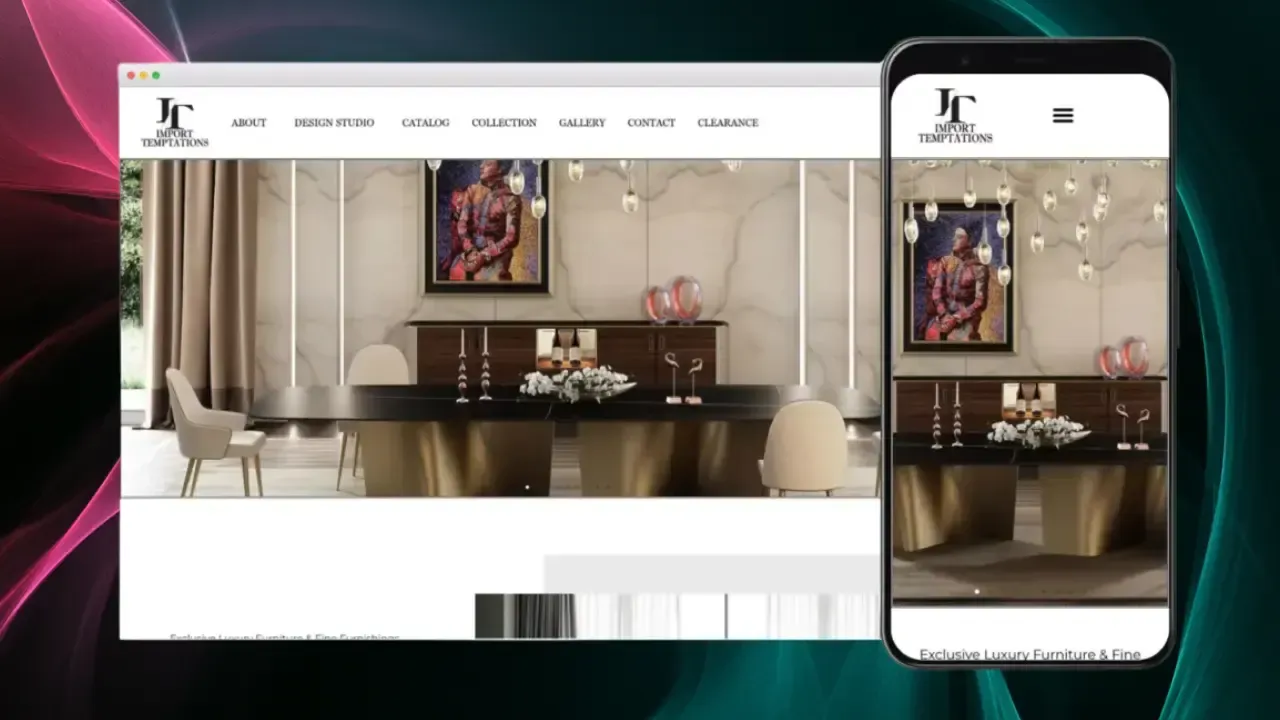
The Import Temptations website on a desktop and a phone, showing a black and gold dining room set.
Rebuilt from WordPress

An agency-built WordPress site that crashed, rebuilt

Our company website, which we had paid another web design firm to build, was not loading properly, and eventually crashed after only a few months of operation. We discovered the website was poorly constructed and needed to be rebuilt. After just paying a company to design our website, it was difficult to trust another company to do the same thing again, but Patrick was reliable, easy to work with, well priced, and delivered all that he promised!
Shiva Khalilnia Co-Founder Import Temptations · Google review
See the Import Temptations project
Switching

How switching from WordPress works

The goal: nobody who finds you today hits a dead end tomorrow. Here’s the order I do it in.

  1. Find out what’s working

    Before touching anything, I look at which pages bring in your visitors and leads. With your Search Console access, I protect those first.

  2. Back up everything first
    Take a full backup, the files and the database, and export your content as a WordPress file. That keeps every post and page, and it means you could always go back.

  3. Keep your domain where it is

    You don’t have to transfer your domain. It stays with whoever registered it, your host or a separate registrar, and I only change where it points. If it came free with your hosting, check when it renews.

  4. Protect your email

    If your mailboxes live with your WordPress host, they depend on DNS records there. I copy every record before anything changes, so mail keeps arriving.

  5. Redirect every old page

    WordPress addresses follow your permalink setting, like /?p=123 or /post-name/. Each one gets a permanent (301) redirect to its new page, and your business name, address and phone stay exactly the same.

  6. Rebuild forms and bookings, then test them

    Save any entries your form plugin keeps. Then forms are rebuilt and tested end to end, and bookings move to the plan’s built-in calendar booking. A store gets its own quote.

  7. Review, launch, then cancel hosting

    You review the new site before it goes live. Once it’s live and the forms, email and redirects check out, you cancel the hosting. Don’t cancel anything that still holds your domain or email.

Pricing

Everything in one plan

No build fee, no contract, no upsells. Here’s every feature the monthly price covers.

The Everything Plan

One plan, because you should not have to study a comparison table to buy a website. Every feature below is included from day one.

$95/month

$0 to build. No contract. Cancel anytime.

Your website is yours from day one.

A site built for you, not from a template

Imagine what you could accomplish with more than just a Home, About and Contact page.

Built for speed

Hand-coded and served from data centers around the world, not a page builder dragging its own weight around. Fast on any phone, on any connection.

Custom illustrations

No junky stock photos or cookie cutter icons here.

Copywriting

Great copywriting is the difference between a website that sells and one that doesn't.

On-page SEO

Essentially this means making it as easy as possible for Google and AI to find you.

Custom lead forms

Forms that actually convert visitors into leads.

Easy analytics

Plain, simple, straightforward, valuable analytics anyone can read.

100's of local SEO pages

Local SEO requires hyper-local intent targeting. Almost every service-based business needs this!

Blog

Blogs are awesome if they are used authentically. The age of purely info-based content is over.

Social media integration

We can integrate your social media content directly into your website. Strategically, of course. We don't want visitors getting distracted!

Automated reviews management

Automatically add new reviews from review platforms (Google, Yelp, etc) directly into your website.

Online calendar bookings

Let visitors book meetings, sessions and appointments directly through your site.

Email newsletter integration

Email newsletters help turn your visitors into subscribers.

Automated legal policies

Your Privacy Policy and Terms and Conditions are generated by a specialist legal-policy service and update automatically as privacy laws change. Included, with nothing for you to maintain.

CRM integrations

We connect your forms to the CRM you already use: HubSpot, Salesforce, Zoho and most other software that connects with outside apps. A custom system gets its own scope.

Advanced integrations

Automations that send each new lead to the right person, log it in your spreadsheets and handle the follow-up.

Hosting

Not all hosting is created equal. If you want the Taco Bell of web hosting, Bluehost is waiting for you.

Unlimited Updates

Changes to hours, photos, text and services are included. Routine edits have a 72-hour target; larger requests get an agreed scope and completion date.

1-on-1 VIP support, direct with Patrick

No call centers, no offshoring, just your friendly neighborhood Patrick. Based in North America, native English speaker, and fluent in Spanish if that is easier for you.

Get Started
FAQs

Questions about switching from WordPress

Is WordPress free?

The software is. WordPress is free and open source. You pay for hosting and a domain, plus any premium theme, plugin or developer you use. DreamHost’s Launch plan, as one example, is $4.99 a month for the first 3 months, then $11.99 a month on monthly billing.

What’s the difference between WordPress.com and WordPress.org?

Hosting. WordPress.com includes managed hosting on paid plans, with updates, backups and SSL handled for you. WordPress.org is the free software you install on a host you pick and look after yourself. This page compares the self-hosted kind.

Can you move my WordPress site over as it is?

Not as WordPress. I rebuild it as a custom-coded site, reuse your text and photos, and redirect every old page. Your WordPress backup stays yours, so you can always put it back on a host.

Will I lose my Google rankings if I leave WordPress?

Nobody can promise rankings won’t move at all. What protects them: every old page gets a permanent (301) redirect, your business name, address and phone stay identical, and I submit the new sitemap and watch Search Console after launch.

Can I still install plugins?

No. The site is custom-coded, so there’s no plugin library. Forms, bookings, reviews and CRM connections are part of the plan. If you need something else, ask me and I’ll tell you what it takes.

If I leave you later, can I go back to WordPress?

Yes. You get every file of the site. It’s custom-coded, so it won’t open in a WordPress dashboard. Going back to WordPress means a rebuild, and bigger changes to the custom-coded site need a developer.

Isn’t $95 a month a lot more than WordPress?

In cash, yes. The software is free, and hosting can cost $5 to $12 a month. The difference pays for someone else doing the design, writing, updates and changes. If you or your developer enjoy that work, WordPress is the better deal.